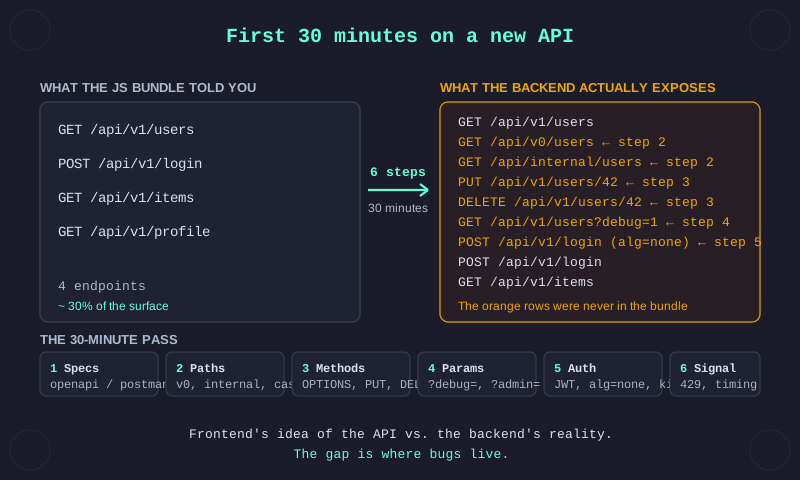
The previous post was about the first ten minutes on a new JavaScript bundle. That gets you a map. This one is about walking the territory.
The JavaScript bundle tells you what the frontend thinks the API looks like. Authentication flows, what endpoints the UI calls, what roles the frontend gates on. That's maybe thirty to fifty percent of what the backend actually exposes. The rest is older versions that never got retired, internal endpoints the UI doesn't use, admin paths, debug toggles and parameters the docs never mentioned because they were only ever internal.
Thirty minutes is roughly the window I give a new API before I decide whether it's worth deeper time. The order below is the one I use. Step 1 is where the JS post leaves off, then you keep going.
Step 1. Pull what's already visible. Before probing anything, inventory what the target hands you for free. The JS bundle already gave you the endpoints the frontend calls. On top of that, check every API subdomain for machine-readable specs the team published without thinking of them as exposure.
# Common OpenAPI and Swagger locations
for p in /swagger /swagger-ui.html /api-docs /api-docs.json \
         /openapi.json /openapi.yaml /v3/api-docs /docs; do
  curl -so /dev/null -w "%{http_code} $p\n" "https://api.target.com$p"
done

# Plus robots.txt and sitemap.xml on every subdomain
curl -s https://api.target.com/robots.txt
curl -s https://api.target.com/sitemap.xml

# Plus GitHub dork for leaked Postman collections
# github.com "collection.json" "target.com"
When any of these hits, you have the API's full surface on a plate. That's the best possible case. Most targets don't leak a spec but enough do that thirty seconds of curl is the right opening move.
For the rest of the post, assume nothing leaked. You have a list of endpoints from the JS bundle and nothing else.
Step 2. Path and version probing. Every /api/v1/X that works is a hint at three others. There was a /v0/ before it, often still deployed and often predating the current auth middleware because the middleware was added later. There is probably a /v2/ in development that might be reachable with a header flip or a direct hit. There is often an /internal/X, /admin/X, /beta/X or /_private/X neighbor in the same router.
Probe them. Every version gets a separate auth and rate-limit config. New endpoints on current versions get the modern protections. Old endpoints on old versions sometimes got left with the protections the framework shipped with in 2019.
# Swap the version segment on every known endpoint
for v in v0 v1 v2 v3 internal admin beta _private; do
  curl -so /dev/null -w "%{http_code}  /$v/users\n" \
       "https://api.target.com/$v/users"
done
One variation that is rare but worth the keystroke is path casing. If /api/getUsers returns 403, try /API/getUsers, /aPi/getUsers, /api/GetUsers. Some authorization middleware compares paths case-sensitively while the router normalizes case-insensitively, so the request reaches the handler with the auth check bypassed. In a decade of testing I have landed this fewer than ten times, but the test is one extra request per 403 and the finding is a full authorization bypass when it works. Full writeup in the casing bypass post.
Step 3. Method expansion. Most testers send GET. That is maybe a third of what the backend accepts.
Run OPTIONS against every discovered endpoint first. It is meant to return allowed methods for CORS but often returns more than the UI actually uses. An endpoint whose UI only GETs but whose OPTIONS advertises PUT, DELETE, PATCH is a write path the frontend does not expose. Those are where missing auth checks live, because the developer who wrote the GET handler sometimes left the write handler wired up without a guard.
curl -X OPTIONS -i https://api.target.com/api/v1/users/42
# Allow: GET, PUT, DELETE, PATCH, OPTIONS   ← write verbs the UI never uses

# Then probe each verb the UI doesn't call
for m in PUT DELETE PATCH POST; do
  curl -so /dev/null -w "%{http_code}  $m /api/v1/users/42\n" \
       -X $m "https://api.target.com/api/v1/users/42"
done
Past GET and OPTIONS, the hits I see most often: PUT on endpoints the UI only reads, DELETE without confirmation or auth re-check, PATCH that accepts broader fields than the UI edit form exposes. The asymmetry between what the UI uses and what the backend accepts is one of the cleanest places to find bugs in 2026.
Step 4. Parameter discovery. You have endpoints. Now find parameters the documentation never mentioned.
Two patterns. First, common internal parameters that developers forget they left in: debug=1, admin=1, expand=, include=, fields=, _debug=, preview=, format=xml, format=csv, raw=1, verbose=1. Throw them at every endpoint and watch for a response that differs. A longer body, an extra field, a different Content-Type, any of those is a signal.
Second, parameter pollution. Send the same name twice with different values.
curl "https://api.target.com/api/v1/items?id=1&id=2"
# Framework behavior varies: Express keeps last, Flask keeps first,
# some parsers build an array. The gap between the auth layer's pick
# and the data layer's pick is how cross-tenant reads happen.
On GraphQL, run introspection before anything else. Most modern targets disable it in production. The ones that don't hand you the full schema.
curl -X POST https://api.target.com/graphql \
  -H 'Content-Type: application/json' \
  -d '{"query":"{__schema{types{name fields{name}}}}"}'
Step 5. Auth boundary probing. The honest answer here has changed in the last decade. Pure JWT claim-swap attacks are mostly dead: proper signing, proper verification, server-side re-check. alg=none was patched in every mainstream library years ago. On a modern target you run the tests because they take thirty seconds, not because you expect to land.
Specific failure modes still show up:
alg=none. Five-second check to eliminate it- Weak or default signing secrets. Run the token through
jwt_tool --crackwith rockyou. I have hit this a handful of times across ten years. The most memorable one was a secret that turned out to be a single space character," ". Others have been placeholder strings left over from a dev bootstrap and never rotated:secret,changeme, the company's own name, a developer's first name. None sophisticated. All production kidparameter injection orjkuabuse. Rare, but a five-minute test- Claim swap where the server trusts the JWT field without re-validating against the session. Still possible on legacy or internal microservices that proxy auth from a gateway and assume upstream already checked
# Quick elimination pass on every JWT you hold
jwt_tool <token> -I -pc role -pv admin    # claim swap with alg=none
jwt_tool <token> -C -d /usr/share/wordlists/rockyou.txt
None of these are your first bet in 2026. They are the tests you run while mapping the auth surface so when you find an endpoint that clearly trusts a claim blindly, you have the exploit already warm.
Step 6. Response signal. The API's responses tell you more than the bodies they send.
- Rate limits. Hit a known endpoint a hundred times in a tight loop. If you see
429, note the threshold. Then try the same against/internal/or/admin/paths you found in step 2. Endpoints with no rate limit when the rest of the API has one are usually internal paths the gateway forgot to cover - Error text. Send malformed bodies. Stack traces that name the framework, DB column or internal hostname are signal.
DataIntegrityViolationException on user_id columnin a production error tells you the ORM, the column name and that error detail is not being stripped. All three feed later testing - Timing. A normal read returns in 200ms consistently. One endpoint returns in 2 seconds. That one is hitting the DB directly, making an internal HTTP call or running an expensive operation. All three are interesting
- Status-code asymmetry.
401on an endpoint that does not exist,403on one that does. Some APIs leak existence through status codes, which is a user-enumeration vector when applied to account IDs or tenant IDs
If running six passes across every endpoint sounds tedious, it is. A few tools wrap the pattern:
kiterunner(Assetnote, Go). API endpoint discovery with real API wordlists, handles method variationffufwith an API-focused wordlist, not a generic web-fuzz list. Assetnote publishes decent onesinqlfor GraphQL introspection and query generationjwt_toolfor JWT decoding, algorithm confusion and weak-secret cracking- Burp Repeater or
httpiefor the manual exploration that tooling does not cover
Use them as a first pass. What they miss is what a human reading the responses catches without trying: a casing quirk, a parameter name that only makes sense in context, an error message that hints at the real data model. The automation is scaffolding, not a replacement. If the automated pass comes back empty and the target is interesting, read the responses yourself.
At the thirty-minute mark you should have: a full endpoint list, a sense of which versions exist and how each authenticates, which methods the backend actually accepts, a handful of parameters the UI never sends, a read on the auth model and a few timing or rate-limit anomalies worth following up.
That is not findings. That is a map.
Most APIs do not surprise you past thirty minutes. Most have consistent auth, no old versions running, no debug parameters left in, no weak secrets. You will waste more thirty-minute windows than you will turn into reports. Triage fast, move on without guilt when the API has nothing to say.
The ones that do pay off usually pay off on step 2 or step 5 in my experience. Rarely step 3 or step 4. Almost never step 6 on its own, though step 6 often confirms a lead the other steps opened.
The JS bundle gave you the frontend's idea of the API. The six steps above give you the backend's reality. The gap between those two is where the bugs live.