exifray
go install github.com/mmarting/exifray@latest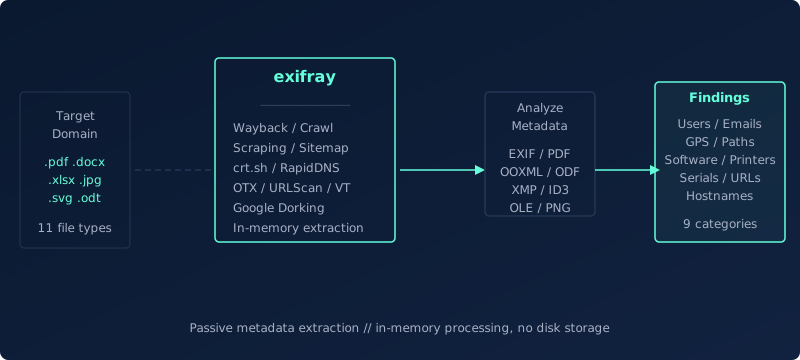 Swipe to see the full diagram →
exifray discovers publicly accessible files on a target domain, extracts their metadata in memory and writes nothing to disk. It queries 19 discovery sources, crawls the site and the subdomains that certificate transparency and passive DNS reveal, and refetches from the Wayback Machine anything the live host no longer serves. Where the format allows, only the byte ranges that carry metadata are transferred. It parses EXIF, IPTC, MakerNotes, PDF, OOXML/ODF, OLE2, XMP, ISO base media, PE, RTF and EML, and surfaces findings across 12 categories: usernames, emails, GPS coordinates, internal paths, software versions, printer names, serial numbers, credential-shaped strings, handling markings and superseded revisions. A correlation pass then clusters name spellings into identities, infers the organisation's email format, builds a software inventory with end-of-life notes, profiles authoring hours and time zones, and groups GPS coordinates into sites. Results go to the terminal, JSON, NDJSON, per-category artifact files, Markdown or HTML.
How it works
Features
- 19 discovery sources (14 keyless, 4 API-based, 1 opt-in)
- In-memory processing: nothing is ever written to disk
- Subdomain expansion: hosts from CT logs and passive DNS get crawled for documents
- Real crawler with configurable depth, JavaScript bundle parsing and common document-directory probing
- Byte-range fetching: only the ranges carrying metadata are transferred, with full download as fallback
- Wayback Machine fallback for files the live host no longer serves, preferring the earliest (least sanitised) capture
- Correlation pass: identity clustering, email-format inference, software inventory with EOL notes, activity profiling and GPS clustering
- 12 detection categories: GPS, users, emails, software, printers, serials, paths, URLs, hostnames, secrets, classification markings, revisions
- 13 file type families, including MP4/MOV/HEIC, PE executables, RTF and EML
- Deep OOXML reading: comment and tracked-change authors, external workbook links, templates, printer DEVMODE, speaker notes, connection strings
- Deep PDF reading: object-index parser, signature signer, annotation targets, page text and recovered prior revisions
- IPTC IIM, MakerNotes and PNG eXIf, with stock-agency credits excluded from the people list
- Confidence scoring on every finding, separate from severity
- Result cache for extraction and per-source URL lists (172s cold vs 33s warm on a real target)
- Local directory mode: run every parser over files already on disk, no network at all
- Diff mode against a previous run, with webhook notification for continuous monitoring
- Artifact output: users.txt, emails.txt, candidate-emails.txt, software.csv, gps.kml, urls.txt, report.md and report.html
- Direct URL input from stdin, so gau, katana or waymore can feed it
- Combined mode merges every domain of an organisation into one people list
- Proxy support (HTTP, SOCKS5), rate limiting, retries with backoff and JSON/NDJSON output
Discovery Methods
| Method | Type | Description |
|---|---|---|
| Wayback Machine | Included | CDX API for historical file URLs, streamed and paged with resumeKey |
| Common Crawl | Included | CC Index API across several recent indexes, not just the newest |
| Web Scraping | Included | Crawls in-scope pages, reads JavaScript bundles and probes common document directories |
| Sitemap | Included | Parses sitemap.xml and linked sitemaps, gunzipping compressed ones |
| robots.txt History | Included | Every archived version: Disallow paths are a list, written by the target, of what it did not want crawled |
| CertSpotter | Included | Certificate Transparency logs, keyless tier (a few queries per hour) |
| crt.sh | Included | Certificate Transparency logs; frequently returns 502, CertSpotter covers the same ground |
| RapidDNS | Included | Subdomain discovery via rapiddns.io, feeding the expansion phase |
| OTX Passive DNS | Included | Hostnames from passive DNS, feeding subdomain expansion |
| AlienVault OTX | Included | URL list for the domain (optional API key raises rate limits) |
| URLScan.io | Included | Search API paged with search_after (optional API key raises rate limits) |
| HackerTarget | Included | Host search API for domain-associated URLs |
| DuckDuckGo | Included | File-type dorking with no key required |
| VirusTotal | API key | URL discovery via the domain endpoint (free tier: 500 lookups/day) |
| Brave Search | API key | File-type dorking against an independent search index |
| GitHub Code Search | API key | Document URLs referenced in public repositories |
| Chaos | API key | ProjectDiscovery subdomain dataset |
| Public Buckets | Opt-in | Anonymous listing of S3, GCS and Azure containers named after the target (-s buckets) |
| Google Search | Paid API | File-type dorking via Custom Search API (requires API key + Custom Search Engine ID) |
Usage Examples
Options
| Flag | Description |
|---|---|
| -d, --domain | Target domain (required unless -l, -u or stdin) |
| -l, --list | File with a list of domains (batch mode) |
| -u, --urls | File with a list of URLs, or - for stdin (skips discovery) |
| --dir | Scan files in a local directory instead of the network |
| -s, --sources | Sources to use, comma-separated (default: all) |
| -e, --extensions | File extensions, replacing the defaults |
| --ext-add | File extensions to add to the defaults |
| --expand-hosts | Crawl this many discovered subdomains, 0 disables (default: 25) |
| --crawl-depth | Crawl depth per host (default: 2) |
| --crawl-pages | Max pages crawled per host (default: 60) |
| --crawl-known | Visit N pages other sources found, looking for document links (default: 150) |
| --cc-indexes | Common Crawl indexes to query (default: 3) |
| --limit | Max file URLs to analyze, 0 = unlimited (default: 0) |
| --urls-only | Print discovered file URLs and exit |
| -w, --workers | Concurrent workers (default: 20) |
| --host-concurrency | Max simultaneous requests per host (default: 5) |
| --timeout | HTTP timeout in seconds (default: 15) |
| --max-retries | Max retries on transient errors (default: 2) |
| --retry-delay | Retry delay in seconds (default: 2) |
| --max-size | Max megabytes downloaded per file (default: 50) |
| --range-fetch | Fetch only the bytes that carry metadata (default: true) |
| --archive-fallback | Refetch from the Wayback Machine when a file is gone (default: true) |
| --no-archive-fallback | Disable the Wayback Machine fallback |
| --archive-rate-limit | Max Wayback requests per second, 0 = unlimited (default: 2) |
| --archive-only | Fetch from the archive without trying the live host |
| --archive-latest | Use the most recent capture instead of the earliest |
| --cache-dir | Cache results here so re-runs skip completed work |
| --cache-ttl | Expire cached entries after N days, 0 = never (default: 0) |
| --cache-discovery-ttl | Hours a cached URL list stays usable (default: 24) |
| --rate-limit | Max HTTP requests per second, 0 = unlimited (default: 0) |
| --proxy | Proxy URL (http:// or socks5://) |
| -k, --insecure | Skip TLS verification (for an intercepting proxy) |
| -v, --verbose | Enable verbose output |
| -q, --quiet | Silent mode: findings only, one per line |
| --json | Output results as JSON |
| --stream | Emit one NDJSON record per result as it completes |
| -o, --output | Write results to file (JSON) |
| --output-dir | Write per-category artifact files and a report |
| --show-urls | Show source file URLs per finding |
| --min-severity | Minimum severity: info, interesting, notable (default: info) |
| --diff | Report only findings absent from a previous JSON run |
| --no-intel | Skip the correlation pass |
| --html | Also write report.html into --output-dir |
| --webhook | POST a summary here when findings exist |
| --combined | Merge results across all scanned domains |
| --exit-code | Exit 1 when nothing is found |
| -c, --config | Config file path (default: $HOME/.exifray.conf) |
| --version | Print version and exit |
| -h, --help | Display help information |
This tool covers one part of the job. In a pentest, it sits inside the wider process of mapping the surface, testing trust boundaries and documenting reproducible findings.